
If your support team is overwhelmed, it’s rare because they lack effort. It’s because they’re buried under repetitive, preventable, and manually executed workflows.
Every day, agents
- Answer the same billing questions
- Track shipments manually
- Sort tickets into queues
- Translate messages
- Summarize conversations
- Follow up on refunds
- Monitor social media complaints
These are not “high empathy” conversations. Their operational processes disguised as customer interactions.
And this is exactly where AI workflows for customer service create a measurable impact.
According to Gartner, organizations that strategically implement AI in customer service reduce operational costs while improving response speed and quality. Similarly, McKinsey & Company reports that AI automation can increase customer service productivity by 30–45% when embedded at the workflow level.
In this blog, we’ll break down 10 customer service workflows for support teams you can automate today, with before/after clarity, operational impact, and practical implementation insights aligned with modern support stacks like Support AI.
What are AI Workflows for Customer Service?
AI workflows for customer service are structured support processes that use artificial intelligence to execute, optimize, or assist with repetitive and decision-based tasks across the customer journey.
Instead of agents manually categorizing tickets, routing queries, drafting responses, tracking orders, or analyzing feedback, AI systems handle these steps automatically using intent detection, sentiment analysis, and historical resolution data.
These workflows reduce manual CX tasks that slow teams down. AI can classify tickets, prioritize urgent issues, trigger proactive notifications, generate response drafts, summarize conversations, and monitor SLA risks in real time.
Why Enterprises Search for AI Workflows for Customer Service
Support leaders usually trying to solve one of these problems:
- Rising ticket volume without proportional hiring
- SLA breaches and slow first response times
- Escalations due to misrouted tickets
- High cost per resolution
- Poor CSAT despite strong agent performance
- Manual CX tasks draining productivity
Now let’s break down the workflows.
The 10 AI Customer Service Workflows you can Automate Today
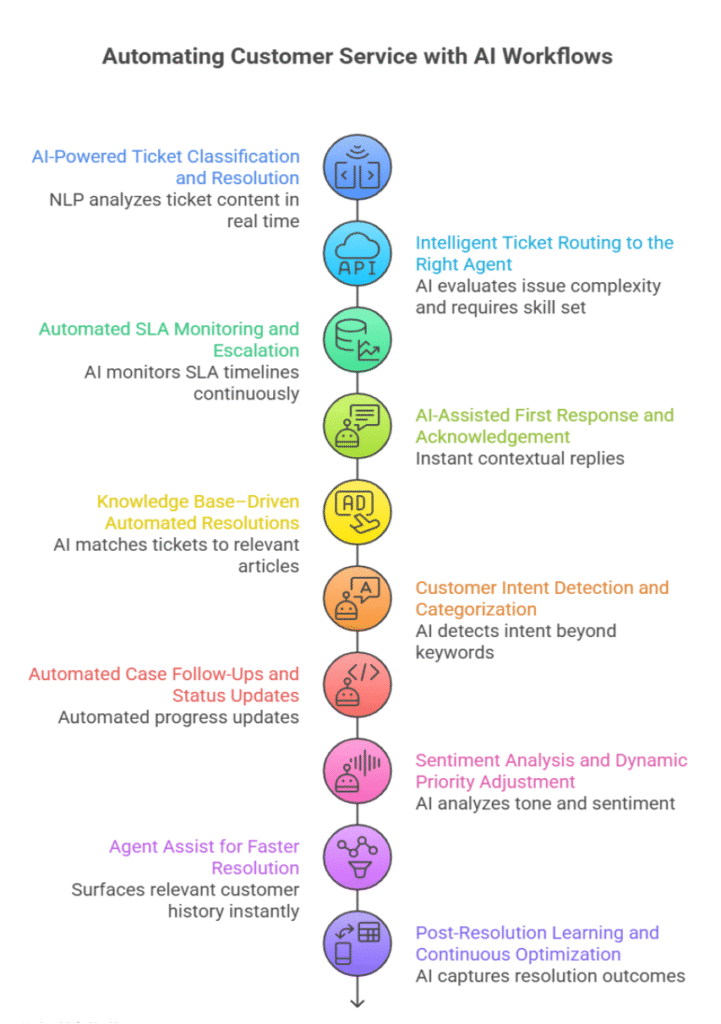
 1. AI-Powered Ticket Classification and Resolution
Manual ticket handling slows down modern support teams. Every incoming request must be read, interpreted, categorized, prioritized, and assigned, consuming valuable agent time and increasing the risk of misrouting.
| Challenge in the Process | How AI Transforms it | DTskill Support AI |
| Agents manually read and interpret every ticket | NLP analyzes ticket content in real time | Connects to CRMs, helpdesk, email, chat, and call center systems to capture tickets instantly |
| Inconsistent categorization and tagging | AI classifies by issue type, urgency, and business impact | Classifies tickets using AI models trained on historical data |
| Manual prioritization based on guesswork | Applies SLA rules, severity logic, and customer tiers automatically | Prioritizes based on SLAs, customer value, and severity |
| Slow resolution for repeatable issues | Triggers automated resolutions for repetitive cases | Routes simple cases to automated workflows; escalates complex cases with full context |
Business Impact
- Faster response times
- Improved First Contact Resolution (FCR)
- Reduced misrouting
- Higher agent productivity
- Scalable support without increasing headcount
2. Intelligent Ticket Routing to the Right Agent
Traditional routing systems rely on static rules or “next available agent” logic, ignoring skills, workload, and historical success rates.
| Challenge in the Process | How AI Transforms It | DTskill Support AI |
| Rule-based routing ignores agent expertise | AI evaluates issue complexity and requires skill set | Matches tickets based on skill, historical resolution success, and workload |
| Reassignments and delays | Context-driven routing reduces handoffs | Routes to best-fit agent with complete ticket history |
| Uneven workload distribution | AI balances workload dynamically | Adjusts routing based on real-time availability |
Business Impact
- Fewer ticket handoffs
- Faster resolution cycles
- Better agent utilization
3. Automated SLA Monitoring and Escalation
Tracking SLAs manually across channels is nearly impossible at scale.
| Challenge in the Process | How AI Transforms It | DTskill Support AI |
| SLA clocks tracked manually | AI monitors SLA timelines continuously | Real-time SLA tracking across channels |
| Escalation after breach | Predictive alerts before deadline risk | Triggers automated escalations before violations |
| Limited leadership visibility | Dynamic dashboards and risk alerts | Provides visibility into SLA health and breach risks |
Business Impact
- Consistent SLA compliance
- Reduced escalations
- Better operational visibility
4. AI-Assisted First Response and Acknowledgement
The first response shapes customer perception, even before resolution.
| Challenge in the Process | How AI Transforms It | DTskill Support AI |
| Delayed acknowledgements | Instant contextual replies | Generates personalized acknowledgements automatically |
| Generic responses | Context-aware, issue-specific replies | Adapts response based on issue type and customer profile |
| Repetitive drafting effort | AI-generated response suggestions | Supports agents with pre-drafted, editable replies |
Business Impact
- Faster acknowledgements
- Higher CSAT
- Reduced follow-up queries
5. Knowledge Base–Driven Automated Resolutions
Most companies have knowledge of assets, but they remain underutilized.
| Challenge in the Process | How AI Transforms It | DTskill Support AI |
| Agents manually search for answers | AI matches tickets to relevant articles | Suggests best-fit knowledge articles automatically |
| Slow resolution for known issues | Auto-response for repeat queries | Triggers automated resolutions for recurring issues |
| Stagnant knowledge base usage | Continuous learning improves recommendations | Learns from resolution outcomes to refine suggestions |
Business Impact
- Instant resolution for repeat issues
- Reduced agent effort
- Continuous knowledge optimization
6. Customer Intent Detection and Categorization
Customers often describe issues vaguely or emotionally.
| Challenge in the Process | How AI Transforms It | DTskill Support AI |
| Keyword-based tagging misses’ nuance | AI detects intent beyond keywords | NLP models interpret requests, complaints, and escalation signals |
| Misclassified tickets | Improved categorization accuracy | Aligns classification with historical patterns |
| Manual interpretation effort | Real-time automated intent detection | Automates categorization across channels |
Business Impact
- Improved accuracy
- Better routing
- Smarter automation triggers
7. Automated Case Follow-Ups and Status Updates
Follow-up requests inflate ticket volume unnecessarily.
| Challenge in the Process | How AI Transforms It | DTskill Support AI Workflow |
| Manual status communication | Automated progress updates | Sends proactive notifications at workflow milestones |
| High volume of follow-ups | Predictive updates reduce inbound queries | Notifies customers about delays or progress automatically |
| Inconsistent communication | Standardized update cadence | Closes the loop post-resolution |
Business Impact
- Fewer inbound follow-ups
- Higher transparency
- Increased customer trust
8. Sentiment Analysis and Dynamic Priority Adjustment
Some of the most critical tickets don’t look urgent; they sound urgent.
| Challenge in the Process | How AI Transforms It | DTskill Support AI |
| Urgent emotional cases overlooked | AI analyzes tone and sentiment | Detects frustration and escalation risk in real time |
| Static priority assignment | Dynamic reprioritization | Adjusts ticket priority based on sentiment signals |
| Reactive handling | Early risk detection | Flags churn-risk customers automatically |
Business Impact
- Reduced churn risk
- Better handling of high-stress cases
- Improved overall customer experience
9. Agent Assist for Faster Resolution
Agents often switch between systems while resolving complex issues.
| Challenge in the Process | How AI Transforms It | DTskill Support AI |
| Manual data lookup | Surfaces relevant customer history instantly | Aggregates cross-system context within ticket view |
| Uncertain next steps | Suggests next-best actions | Recommends workflows and resolution paths |
| Response drafting effort | AI-generated reply to suggestions | Assists agents with contextual draft responses |
Business Impact
- Faster resolution
- More consistent service quality
- Higher agent satisfaction
10. Post-Resolution Learning and Continuous Optimization
Most support systems stop evolving after ticket closure.
| Challenge in the Process | How AI Transforms It | DTskill Support AI |
| Closed tickets not analyzed | AI captures resolution outcomes | Learns from every resolution |
| Static routing and classification rules | Model refinement over time | Continuously improves categorization accuracy |
| Limited ROI visibility | Performance insights | Optimizes automation triggers dynamically |
Business Impact
- Self-improving operations
- Higher long-term automation ROI
- Increasing accuracy over time
Final Thoughts
Customer expectations are rising, but support budgets and headcounts can’t scale at the same pace. That’s why AI workflows for customer service are foundational. By automating repetitive and rule-based tasks like ticket classification, routing, SLA monitoring, follow-ups, and response drafting, organizations free their agents to focus on complex, high-value interactions that truly require human judgment and empathy.
The real impact of AI is smarter operations. It prevents SLA breaches before they happen, detecting frustration before it escalates, and proactively resolving issues before customers even reach out. Over time, these improvements compound, reducing ticket volume, improving first-contact resolution, and increasing customer satisfaction.
When workflows become intelligent and self-improving, support teams become more agile, more scalable, and more consistent. The future of customer service belongs to organizations that combine human expertise with AI execution.
FAQs
1. What are AI workflows for customer service?
They are structured support processes enhanced by AI to automate classification, routing, prioritization, monitoring, and resolution.
2. Which workflow should be automated first?
Ticket classification and intelligent routing typically deliver the fastest ROI.
3. Does AI replace customer service agents?
No. AI reduces repetitive tasks and assists agents, enabling them to focus on complex cases.
4. How does AI improve SLA compliance?
By monitoring timers in real time, predicting breach of risks, and triggering proactive escalations.
5. Is AI suitable for small support teams?
Yes. AI enables smaller teams to handle higher volumes without proportional hiring.
6. How does DTskill Support AI differ from traditional automation?
It uses GenE orchestration to connect multi-channel systems, apply NLP classification, enforce SLA logic, and continuously learn from every resolution.
