If you spend time with HR teams, you’ll notice something consistent: most of their day is spent moving information between systems, responding to employee queries, validating documents, and ensuring processes stay on track. The work is structured, but the coordination behind it is often manual.
That is why AI workflows for HR are becoming practical rather than experimental. Whether it’s routing tickets in HR service desk workflows or managing structured onboarding workflows, AI is being used to move requests forward automatically, apply policy logic, and reduce repetitive back-and-forth.
The opportunity is not to replace HR teams, but to remove friction from high-volume workflows. In this blog, we look at ten HR workflows where AI can be applied realistically and how teams can approach automation in a way that improves consistency, speed, and employee experience.
Where AI Fits Within Modern HR Operations
In most organizations, HR workflows span multiple systems: HRIS platforms, ticketing tools, payroll systems, compliance trackers, and communication channels. While each system performs its function well, the coordination between them often depends on manual routing, follow-ups, and status tracking.
This is where ai workflows for hr begin to add value. AI does not replace core HR systems; it sits across them, guiding requests, validating inputs, and ensuring that actions move forward according to defined policies. The result is more structured automation across high-volume operational processes.
AI typically fits into HR operations in the following areas:
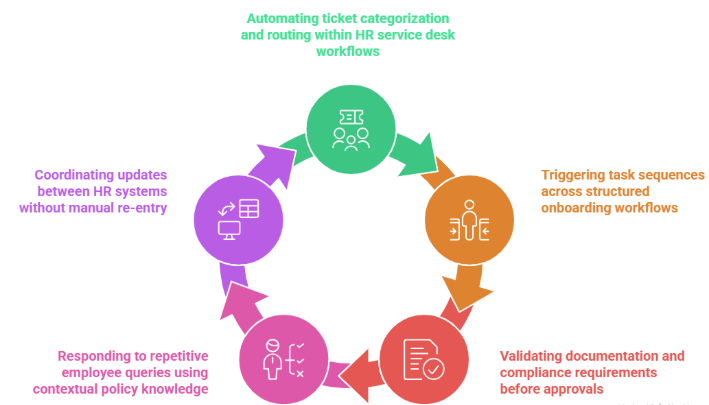
- Automating ticket categorization and routing within HR service desk workflows
- Triggering task sequences across structured onboarding workflows
- Validating documentation and compliance requirements before approvals
- Responding to repetitive employee queries using contextual policy knowledge
- Coordinating updates between HR systems without manual re-entry
When applied at the workflow level, AI helps HR teams spend less time managing transitions between steps. Instead of monitoring processes manually, teams gain clearer visibility and more consistent execution across employee lifecycle operations.
10 HR Workflows You Can Automate with AI
Many HR processes follow repeatable patterns that require coordination across systems, approvals, and documentation. As employee volumes increase, the administrative effort behind these workflows can grow significantly. This is where ai workflows for hr can help HR teams manage scale while maintaining consistency.
Below are ten practical HR workflows where AI automation can deliver immediate operational value.
1. Employee Onboarding Workflows
Employee onboarding often requires coordination between HR, IT, payroll, and management teams. New hires must complete documentation, receive system access, review company policies, and schedule orientation sessions. HR teams also need to ensure every step is completed in the correct order before the employee’s first day. When managed manually, these onboarding workflows can involve multiple follow-ups and task tracking across systems.
What AI Automates
AI can trigger onboarding tasks automatically once a new employee record is created and route tasks to the appropriate teams. It can also track completion of documentation, training sessions, and system provisioning steps.
Operational Benefit
Onboarding becomes faster and more consistent, reducing delays for new employees. HR teams spend less time coordinating tasks and more time focusing on employee engagement.
2. HR Service Desk Ticket Routing
HR teams receive a wide range of employee queries related to policies, payroll, benefits, and leave management. These requests often arrive through multiple channels such as email, portals, or chat systems. HR staff must review each request, categorize it, and route it to the correct team or specialist. Managing high volumes of HR service desk workflows manually can slow response times.
What AI Automates
AI can categorize incoming requests, identify the relevant HR function, and automatically route tickets to the appropriate team. It can also prioritize urgent issues and escalate unresolved tickets.
Operational Benefit
Employees receive faster responses and more accurate routing of requests. HR teams reduce manual ticket triage and improve service desk efficiency.
3. Resume Parsing and Candidate Data Extraction
Recruitment teams often review hundreds of resumes during hiring campaigns. HR staff typically extract candidate details such as contact information, education, work experience, and skills before entering them into applicant tracking systems. This manual data entry process can be time-consuming and prone to inconsistencies. Important candidate information can also be overlooked during high-volume recruitment cycles.
What AI Automates
AI can read resumes, extract structured information, and automatically populate recruitment systems with candidate data. It can also standardize information across profiles for easier comparison.
Operational Benefit
Recruiters spend less time on manual data entry and more time evaluating candidates. Candidate information becomes easier to search, filter, and analyze.
4. Candidate Screening and Shortlisting
After candidate data is collected, HR teams must review profiles and determine which applicants meet job requirements. This process often involves evaluating skills, experience, and qualifications across large candidate pools. When done manually, screening can become time-intensive and inconsistent across recruiters. AI helps structure this early-stage evaluation process.
What AI Automates
AI can analyze candidate profiles against job descriptions and predefined skill criteria. It can score applicants based on relevance and generate a shortlist of candidates.
Operational Benefit
Recruiters can focus on evaluating the most relevant candidates rather than reviewing every application manually. Hiring cycles become faster and more consistent.
5. Skill-Based Mentor or Program Matching
Organizations often run mentorship or professional development programs that pair employees based on skills, career goals, or experience levels. Managing these matches manually can become difficult as participant pools grow. HR teams must compare multiple attributes such as expertise, industry background, and availability. This process can require significant coordination.
What AI Automates
AI can evaluate multiple variables such as skills, industry experience, and career goals to recommend suitable mentor-mentee matches. It can also provide recommendation scores and reasoning behind the match.
Operational Benefit
Mentorship programs become easier to scale while maintaining high-quality matches. HR teams reduce manual evaluation effort and improve program participation.
6. Employee Query Resolution
Employees frequently reach out to HR for help with policy clarifications, benefits information, leave balances, or payroll questions. Many of these requests are repetitive and follow predictable patterns. HR teams often spend a significant portion of their time responding to these queries through email, chat, or internal portals. Managing these requests manually can slow response times and create backlogs.
What AI Automates
AI assistants can respond instantly to common employee questions by referencing HR policy documents and internal knowledge bases. Complex queries can be automatically routed into HR service desk workflows for HR review.
Operational Benefit
Employees receive faster responses without waiting for HR staff availability. HR teams can focus their attention on more complex employee cases.
7. Leave and Absence Management
Leave management requires HR teams to track employee leave balances, validate eligibility, and route requests for manager approval. Each request may involve policy checks, balance verification, and documentation updates. When handled manually, HR staff must verify each step before confirming approvals. This makes leave management one of the more time-consuming ai workflows for hr candidates.
What AI Automates
AI can validate leave balances, check eligibility rules, and automatically route requests to managers for approval. It can also update leave records once requests are approved.
Operational Benefit
Leave requests are processed faster and with fewer manual checks. HR teams spend less time verifying routine requests while employees gain clearer visibility into leave status.
8. Payroll Data Validation
Payroll processing depends on accurate employee data including compensation details, tax information, benefits deductions, and attendance records. HR teams often review payroll inputs manually to ensure accuracy before payroll cycles are finalized. Even small data inconsistencies can lead to payment errors that require corrective processing later.
What AI Automates
AI can scan payroll data inputs to identify inconsistencies, missing information, or policy violations before payroll processing begins. It can flag discrepancies for HR review and validation.
Operational Benefit
Payroll errors are detected earlier, reducing correction cycles and administrative effort. Payroll teams gain greater confidence in data accuracy during each payroll run.
9. Performance Review Documentation
Performance reviews involve collecting feedback from managers, consolidating documentation, and tracking completion across departments. HR teams must monitor submission timelines, organize feedback records, and maintain documentation for future reference. This process often requires significant coordination between HR staff and department leaders.
What AI Automates
AI can organize feedback submissions, generate structured summaries of review inputs, and monitor completion status across teams. It can also trigger reminders for pending evaluations.
Operational Benefit
Performance review cycles become more organized and easier to manage. HR teams spend less time tracking documentation and more time supporting meaningful employee development discussions.
10. Employee Offboarding Workflows
When employees leave an organization, HR teams must coordinate exit interviews, account deactivation, asset returns, and compliance documentation. Each step must occur in the correct sequence to ensure security and regulatory requirements are met. Managing these onboarding workflows in reverse often called offboarding requires careful tracking across multiple departments.
What AI Automates
AI can trigger offboarding tasks automatically when an employee exit is initiated. It can coordinate system access removal, exit documentation, and department notifications.
Operational Benefit
Offboarding processes become more consistent and secure. HR teams reduce manual coordination while ensuring all required steps are completed.
How to Prioritize AI Workflows for HR Teams
Not every HR process should be automated at the same time. The most successful HR teams begin with workflows that are repetitive, high-volume, and rules-driven. Prioritization ensures that ai workflows for hr deliver measurable value without overwhelming teams. A structured approach also helps align automation with HR service goals and compliance standards.
| Prioritization Factor | What HR Teams Should Assess |
| Workflow Volume | Identify processes with frequent, repetitive requests, such as HR service desk workflows. |
| Policy-Driven Logic | Prioritize workflows governed by clear rules and thresholds, such as structured onboarding workflows. |
| Manual Coordination Load | Select processes that require repeated follow-ups, status tracking, or data transfers between systems. |
| Employee Experience Impact | Focus on workflows that directly affect response time, onboarding speed, or employee satisfaction. |
| Integration Readiness | Assess whether the workflow already connects to HRIS or ticketing systems that support automation triggers. |
By starting with structured, high-impact workflows, HR teams can introduce automation gradually and confidently. This approach allows ai workflows for hr to scale in a way that strengthens operations rather than disrupting them.
Best Practices for Implementing AI Workflows for HR Teams
Automation delivers the strongest outcomes when introduced with structure and clarity. HR teams that succeed with ai workflows for hr treat implementation as a workflow redesign effort rather than a software rollout. The focus should remain on improving coordination, maintaining compliance, and protecting employee experience. A phased and policy-aligned approach ensures sustainable results.
✅ Start with High-Volume Workflows – Prioritize repetitive processes such as HR service desk workflows where automation can reduce manual routing immediately.
✅ Align Automation with HR Policies – Ensure workflow logic reflects documented rules, approval thresholds, and compliance standards.
✅ Maintain Human Escalation Paths – Keep defined checkpoints for sensitive cases within structured onboarding workflows and employee lifecycle events.
✅ Integrate with Existing HR Systems – Connect AI triggers directly to HRIS, payroll, and ticketing platforms to avoid fragmented processes.
✅ Define Clear Ownership and Oversight – Assign responsibility for monitoring, refining, and governing automated workflows.
✅ Measure Operational Impact Continuously – Track response times, resolution rates, and employee feedback to evaluate automation performance.
When implemented thoughtfully, AI becomes an operational enhancement rather than a disruption. Over time, ai workflows for hr help HR teams manage scale while maintaining consistency and accountability.
Conclusion
HR teams are not looking for new complexity. They are looking for better coordination across onboarding, service desk requests, compliance checks, and employee lifecycle processes. That is where ai workflows for hr become practical not as a replacement for HR expertise, but as a structured layer that moves repetitive tasks forward consistently.
When applied thoughtfully, automation strengthens HR service desk workflows, improves structured onboarding workflows, and reduces administrative friction across the organization. The goal is not to automate everything at once, but to introduce AI where workflows are predictable, high-volume, and policy-driven. Over time, this creates a more responsive and scalable HR function.
FAQs
1. What HR workflows can AI realistically automate?
AI can automate structured, rules-based processes such as onboarding tasks, ticket routing, document validation, and policy acknowledgment tracking. The most effective ai workflows for hr are repetitive and policy-driven rather than highly subjective.
2. Can AI replace HR teams?
No. AI supports coordination and administrative efficiency, but human oversight remains essential for employee relations, conflict resolution, and sensitive decision-making. Automation enhances HR capacity rather than replacing HR professionals.
3. How does AI improve HR service desk workflows?
Within HR service desk workflows, AI can categorize tickets, route requests to the correct teams, provide instant responses to common queries, and escalate complex cases automatically. This improves response time while maintaining visibility.
4. Is onboarding a good starting point for HR automation?
Yes. Structured onboarding workflows often follow defined steps and documentation requirements, making them well-suited for automation triggers and task sequencing.
5. How should HR teams begin implementing AI workflows?
Teams should start with high-volume, rules-driven processes, integrate automation with existing HR systems, and maintain clear oversight. A phased approach ensures that ai workflows for hr deliver measurable improvements without disrupting core HR operations.
