
Software development workflows have never stayed static. Over time, developers have adopted better tooling from IDEs and version control systems to automated testing and CI/CD pipelines to improve how software is built and delivered. Each shift has focused on one goal: helping teams move from idea to production more efficiently.
A similar shift is now happening with AI. Development teams are beginning to explore how an ai coding workflow can support everyday engineering tasks such as generating initial code structures, refactoring modules, maintaining documentation, and validating outputs. Instead of changing how developers think about software, AI is gradually becoming part of the development environment itself.
The interesting question for engineering teams is no longer whether AI can generate code. It is how developers can design a workflow where AI assistance improves speed and consistency while developers remain fully in control of architecture and implementation. That is the workflow this playbook explores.
What an AI-Augmented Coding Workflow Looks Like
An ai coding workflow integrates AI assistance into key stages of the software development process. Developers use AI tools alongside their existing environments to generate code structures, refine modules, maintain documentation, and validate outputs during development.
In modern dev workflows ai, AI operates as an engineering assistant within the development environment. Developers guide the implementation, define architecture, and review outputs while AI supports routine coding activities that typically require significant manual effort.
A typical AI-augmented development workflow includes:
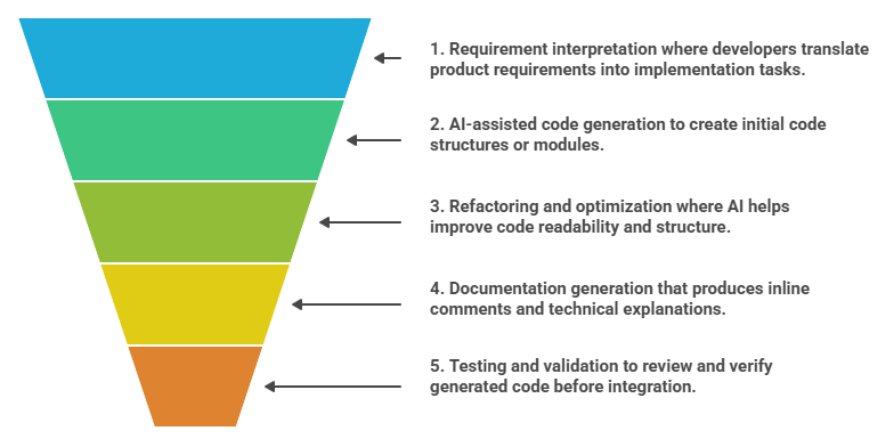
- Requirement interpretation where developers translate product requirements into implementation tasks.
- AI-assisted code generation to create initial code structures or modules.
- Refactoring and optimization where AI helps improve code readability and structure.
- Documentation generation that produces inline comments and technical explanations.
- Testing and validation to review and verify generated code before integration.
When structured this way, an ai coding workflow allows development teams to move from requirements to working code more efficiently while maintaining full developer oversight across the engineering process.
The AI-Augmented Coding Workflow Playbook
An effective ai coding workflow follows the same development lifecycle most engineering teams already use, but integrates AI assistance at points where it can accelerate execution and reduce repetitive effort. Developers still guide the implementation, define architecture, and review the final outputs. AI operates as an engineering assistant that supports the flow of development from requirements to deployment.
A typical dev workflows ai playbook includes the following stages.
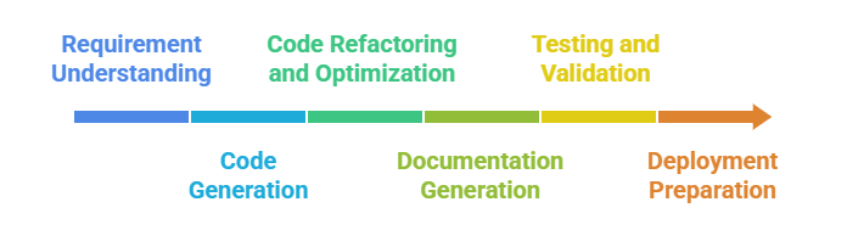
1. Requirement Understanding
Every development cycle begins with interpreting product requirements and translating them into engineering tasks. Developers break down features, identify system dependencies, and determine how new functionality will interact with existing services or modules. This stage often involves planning implementation approaches and outlining the technical structure of the solution.
Where AI Helps – AI can assist by summarizing requirements, suggesting implementation patterns, or helping developers quickly outline the structure of the feature before coding begins.
2. Code Generation
Once requirements are defined, developers start implementing the core functionality. This usually involves writing foundational structures such as APIs, service layers, data models, or configuration modules. Much of this work follows repeatable patterns that developers recreate across projects.
Where AI Helps – AI can generate initial code modules or boilerplate structures from prompts or repository context, allowing developers to begin refining a working implementation instead of starting from scratch.
3. Code Refactoring and Optimization
As features evolve, developers refine the structure of the code to improve readability, maintainability, and performance. Refactoring removes redundancy, simplifies logic, and ensures the codebase remains clean as new functionality is added. This process is essential for maintaining long-term code quality.
Where AI Helps – AI can analyze existing modules and recommend refactoring improvements that enhance structure and consistency while preserving the intended behavior.
4. Documentation Generation
Clear documentation helps teams understand how systems work and how modules interact. Developers typically add inline comments, technical notes, and developer documentation to ensure the codebase remains understandable for other contributors. Maintaining documentation manually can often lag behind code changes.
Where AI Helps – AI can generate inline comments, explain code logic, and produce technical documentation automatically as the code evolves.
5. Testing and Validation
Before code is integrated into the main repository, developers run tests to confirm functionality and reliability. This stage includes writing unit tests, validating logic, debugging issues, and ensuring the implementation meets expected behavior. Testing ensures that changes do not introduce errors into the broader system.
Where AI Helps – AI can assist by suggesting test cases, identifying potential issues in the code, or highlighting sections that require further validation.
6. Deployment Preparation
The final step in the workflow involves preparing the code for integration and deployment. Developers ensure that the code follows repository standards, passes automated checks, and integrates smoothly with existing CI/CD pipelines. This stage often includes preparing the code for peer review.
Where AI Helps – AI can assist in reviewing formatting, checking repository patterns, and preparing code for integration into the broader development pipeline.
Following this playbook allows teams to introduce AI assistance throughout the development lifecycle. A structured ai coding workflow helps developers move from requirements to deployment more efficiently while maintaining full control over engineering decisions.
Where AI Improves the Coding Workflow
As development teams begin implementing an ai coding workflow, the impact is most visible at stages where repetitive work or pattern-based coding typically slows progress. AI assistance helps developers move through these stages faster while maintaining consistency across the codebase. Instead of changing how developers think about software, AI enhances how work flows through the development process.
Several stages of modern dev workflows ai benefit from AI assistance.
➡️ Accelerating Initial Code Generation
AI can generate foundational code structures such as APIs, service layers, and data models, allowing developers to begin refining a working implementation rather than starting from an empty file.
➡️ Speeding Up Refactoring Cycles
AI can analyze existing code and suggest structural improvements, helping developers clean up modules, reduce redundancy, and maintain readability across growing codebases.
➡️ Maintaining Continuous Documentation
As code evolves, AI can automatically generate inline comments and technical explanations, helping teams keep documentation aligned with the latest implementation.
➡️ Maintaining Repository Consistency
AI can learn coding patterns from repositories and apply those standards when generating or refactoring code, helping teams maintain consistent structure across projects.
➡️ Supporting Debugging and Issue Resolution
AI assistants can help identify potential issues, highlight problematic sections of code, and suggest possible fixes during development.
➡️ Enabling AI-Augmented Pair Programming
Tools such as Code AI allow developers to collaborate with AI during development by generating code, refining modules, and assisting with documentation directly within the workflow.
These improvements allow development teams to move through coding stages more efficiently while maintaining developer oversight. When integrated thoughtfully, an ai coding workflow supports faster development cycles without disrupting established engineering practices.
Building an AI Coding Workflow with Code AI
Implementing an ai coding workflow requires more than simply introducing AI tools into the development environment. Teams need a structured way to integrate AI assistance into the stages of development where it can provide the most value. This includes supporting code generation, improving code quality through refactoring, maintaining documentation, and ensuring outputs are validated before integration.
Code AI is designed to support these workflow stages by operating directly within development environments. Built on the GenE platform, Code AI functions as an engineering assistant that helps developers generate, refine, and validate code while aligning outputs with repository standards.
The table below illustrates how Code AI supports different stages of an ai coding workflow.
| Workflow Stage | How Code AI Supports It |
| Code Generation | Converts natural language prompts into working code modules or snippets. |
| Code Refactoring | Analyzes existing code to improve structure, readability, and performance. |
| Documentation | Generates inline comments and technical documentation automatically. |
| Testing Support | Suggests validation checks and assists with identifying potential issues. |
| Workflow Integration | Works within IDEs and development pipelines without disrupting existing processes. |
By supporting these stages, Code AI helps teams operationalize dev workflows ai in a practical way. Developers remain responsible for architectural decisions and final implementation, while AI assists with execution across multiple development tasks.
Best Practices for Implementing an AI Coding Workflow
Introducing an ai coding workflow works best when teams approach it as an evolution of existing development practices. The objective is to improve development speed without reducing engineering quality or developer oversight. Clear implementation practices help teams integrate AI assistance into daily development while maintaining reliability and maintainability.
| Best Practice | How Teams Apply It | Why It Matters |
| Maintain Human Code Review | Developers review AI-generated code before merging into repositories. | Ensures architectural alignment and prevents unintended logic errors. |
| Use AI for Repetitive Coding Tasks | Apply AI to generate boilerplate modules, APIs, and configuration structures. | Frees developers to focus on complex engineering tasks. |
| Align AI Outputs with Repository Standards | Allow AI tools to learn patterns from existing repositories. | Maintains consistent coding style across the codebase. |
| Integrate AI Within Development Tools | Use AI directly inside IDEs and CI/CD pipelines. | Keeps the ai coding workflow aligned with existing development environments. |
| Validate AI Outputs Through Testing | Run automated tests and linting checks on generated code. | Ensures reliability before integration or deployment. |
| Monitor Workflow Impact | Track development velocity, code quality, and team productivity. | Helps teams refine how dev workflows ai are applied over time. |
Applying these practices helps teams build a structured ai coding workflow that improves productivity while maintaining engineering discipline and code quality.
When Developers Should Still Write Code Manually
Even with the growth of an ai coding workflow, many areas of software development still rely heavily on developer expertise. Architecture decisions, system design, and defining how services interact across complex systems require careful planning and deep technical understanding. These decisions shape how applications evolve over time and remain a core responsibility of experienced engineers.
Manual coding also plays an important role in areas that demand precise implementation control. Security-sensitive components, performance-critical modules, and specialized algorithms often require developers to carefully design and validate every line of logic. In these situations, engineering judgment and domain knowledge remain essential to ensure reliability and maintainability.
In practice, development teams increasingly combine both approaches. Developers guide architecture, design core logic, and review implementations, while AI tools support specific stages of dev workflows ai such as generating structures, refactoring modules, or maintaining documentation. This balance allows teams to benefit from AI assistance while preserving the engineering rigor required for production software.
Conclusion
Development workflows have continuously evolved as better tools become available to engineers. Today, the introduction of AI assistance is shaping how teams approach everyday development tasks. A structured ai coding workflow allows developers to integrate AI into stages such as code generation, refactoring, documentation, and validation while maintaining control over design and implementation.
Rather than replacing traditional development practices, AI supports developers in executing routine tasks more efficiently. By combining engineering expertise with dev workflows ai, teams can move from requirements to production-ready code faster while maintaining quality and consistency across projects.
Tools such as Code AI illustrate how AI can function as an engineering assistant within development environments. By helping generate, refine, and document code, these tools allow developers to focus more on architecture, system design, and solving complex engineering challenges.
FAQs
1. What is an AI coding workflow?
An ai coding workflow is a development process where AI tools assist developers during stages such as code generation, refactoring, documentation, and validation. Developers remain responsible for designing systems, reviewing outputs, and integrating the final code into production environments.
2. How do AI tools improve development workflows?
AI tools support dev workflows ai by generating initial code structures, suggesting refactoring improvements, automating documentation, and helping developers validate outputs before integration. This assistance helps reduce repetitive coding effort and speeds up development cycles.
3. Do developers still need to write code manually in an AI-assisted workflow?
Yes. Developers continue to write core logic, design architectures, and review generated outputs. AI tools assist with execution tasks but developers maintain control over implementation decisions and system behavior.
4. What tools help build an AI coding workflow?
AI development assistants such as Code AI help teams implement an ai coding workflow by generating code from prompts, refactoring existing modules, automating documentation, and integrating with development environments.
5. Is AI-generated code safe for production systems?
AI-generated code can be used in production when it follows standard development practices such as code review, testing, and validation. Within dev workflows ai, developers review AI outputs and ensure they meet security, performance, and reliability requirements before deployment.
